Let your coding agent develop firmware on your board
You already use a coding agent to edit firmware. You want it to try the image on the board plugged into your computer, read what the board actually does, and fix failures itself. Agentic Hardware-in-the-Loop (Agentic HIL) gives that agent local hardware tools over MCP so it can complete that loop.
Your existing agent builds with your project's toolchain, flashes the image, resets the target, sends a UART command and checks the answer. If the answer fails the test, it reads the report, changes the firmware, rebuilds and runs the check again. The agent edits and builds; Agentic HIL supplies the hardware tools and test reports. A successful build alone does not establish that the firmware works on the board.
The recorded run below goes through that loop once on a real board, step by step: the task, the failing report, the fix and the rerun that passed, with every report linked. To run the same loop on your own board, go to Begin in your existing firmware project.
What the recorded loop shows
This is a run recorded on 2026-09-15 in stm32-starter, the starter project for a Nucleo-F446RE, from a fresh clone, told in the order it happened. The commands are the ones the record ran, and every excerpt is copied from the record's own files.
| Item | Value |
|---|---|
| Record | 2026-09-15, Linux |
| Agentic HIL | 0.21.5, from the one-line installer |
| Host | Ubuntu 24.04, x86_64 |
| Board | Nucleo-F446RE, through its onboard ST-LINK in-circuit debugger over SWD |
| Backend | OpenOCD 0.12.0 |
| Build tools | CMake 3.28.3, Ninja 1.11.1, arm-none-eabi-gcc 13.2.1 |
| Starter | a fresh clone at ff2cc5c |
The record follows the starter's README and nothing else, from a fresh home
directory. Where the README hands a task to your coding agent, the commands it
lists for the agent were run from a shell, and the exercise's one-line fix was
made in the firmware source. A coding agent in an MCP host runs the same plans
through the test_reactor_run tool, which reaches the same code as the
command: the same preflight, the same permission judged per step, the same
report
(the two ways to run a plan).
The host already met the starter's
hardware prerequisites:
OpenOCD, CMake, Ninja, the GNU Arm Embedded Toolchain, git and curl were
installed, and the account was in the dialout and plugdev groups, so the
in-circuit debugger and the serial port opened without an administrator.
Installing them was not part of the record.
1. The starting problem
The starter's firmware answers a small JSON protocol on the board's virtual COM port at 115200 baud. Its README states the protocol:
| Command | Expected answer |
|---|---|
STATUS |
{"state":"READY","diagnostic":"NONE"} |
DIAG ON |
{"state":"DEGRADED","diagnostic":"E_SELF_TEST"} |
DIAG CLEAR |
{"state":"READY","diagnostic":"NONE"} |
The firmware ships with one deliberate defect, and three test plans in
tests/hil/ hold it to that table. Each plan flashes
build/Debug/stm32-starter.elf, opens the serial port, resets the board into
run mode and waits for its boot line. Then:
nominalsendsSTATUSand claimsREADYwith no diagnostic.diagnosticsendsDIAG ONand claimsDEGRADEDwithE_SELF_TEST.recoverysendsDIAG ON, reads one answer whichever state it reports, sendsDIAG CLEARand claimsREADYwith no diagnostic.
The last two steps of the diagnostic plan,
lines 33 to 41
of tests/hil/diagnostic.testconfig.yaml at that commit:
  - device: dut_uart
    action: uart_write
    text: "DIAG ON\n"

  - device: dut_uart
    action: uart_read
    comparator:
      pattern: "\"state\":\"DEGRADED\",\"diagnostic\":\"E_SELF_TEST\""
    timeout_s: 5
dut and dut_uart are logical names. A plan names no probe serial and no
port; the project's configuration binds both on each bench.
The README gives the coding agent two tasks. First, one sentence:
Set up this project for the attached Nucleo-F446RE and run the three hardware test plans in tests/hil.
Then the exercise:
Run tests/hil/diagnostic.testconfig.yaml on the board, work out why the diagnostic claim goes unmet, make the smallest firmware fix, rebuild, and rerun all three plans. Do not change the test plans or the protocol.
2. Install, then bind the board
curl -LsSf https://agentic-hil.github.io/install.sh | sh
export PATH="$HOME/.local/bin:$PATH"
git clone https://github.com/agentic-hil/stm32-starter.git
cd stm32-starter
uv sync
uv run pytest -q -s
agentic-hil setup --agent codex
agentic-hil doctor
The installer put Agentic HIL 0.21.5 and uv 0.12.10 in ~/.local/bin and
registered the skill and the MCP server for the one agent CLI it found, Codex.
The export line is the starter README's: a new login shell did not find the
command until it ran, which is the first error listed
further down. uv sync set
up the project environment with 14 packages, and the board-free suite reported
3 passed.
agentic-hil setup --agent codex found no STM32CubeProgrammer CLI, found
openocd, picked the in-circuit debugger from the host's USB serial inventory
and bound the board's serial port by its /dev/serial/by-id/ link and serial
number. It wrote the project's configuration outside the repository, naming
the two devices dut and dut_uart. agentic-hil doctor then reported, in
doctor.txt:
Bench binding
  verdict  ok
  Every device this configuration declares names the hardware behind it.
The same output lists the permissions in force: on dut,
allow_debug_execution, allow_flash and allow_reset granted and
allow_mass_erase and allow_raw_debugger_commands closed; on dut_uart,
allow_write granted.
3. Build, and run the three plans
cmake --preset Debug
cmake --build --preset Debug
agentic-hil test-reactor --test-config tests/hil/nominal.testconfig.yaml
agentic-hil test-reactor --test-config tests/hil/diagnostic.testconfig.yaml
agentic-hil test-reactor --test-config tests/hil/recovery.testconfig.yaml
The build exited 0 with 936 bytes of flash used. All three plans flashed that image, and two of them passed:
| Plan | Exit code | Result | Transcript | Report |
|---|---|---|---|---|
| nominal | 0 | ok: true |
nominal.txt | run-1-nominal.json |
| diagnostic | 1 | ok: false, failed_step 6, comparator_unmet |
diagnostic.txt | run-2-diagnostic.json |
| recovery | 0 | ok: true |
recovery.txt | run-3-recovery.json |
Each run printed the path of the report it keeps, which later runs do not overwrite, so the record holds all six reports of the walk.
4. What the board answered
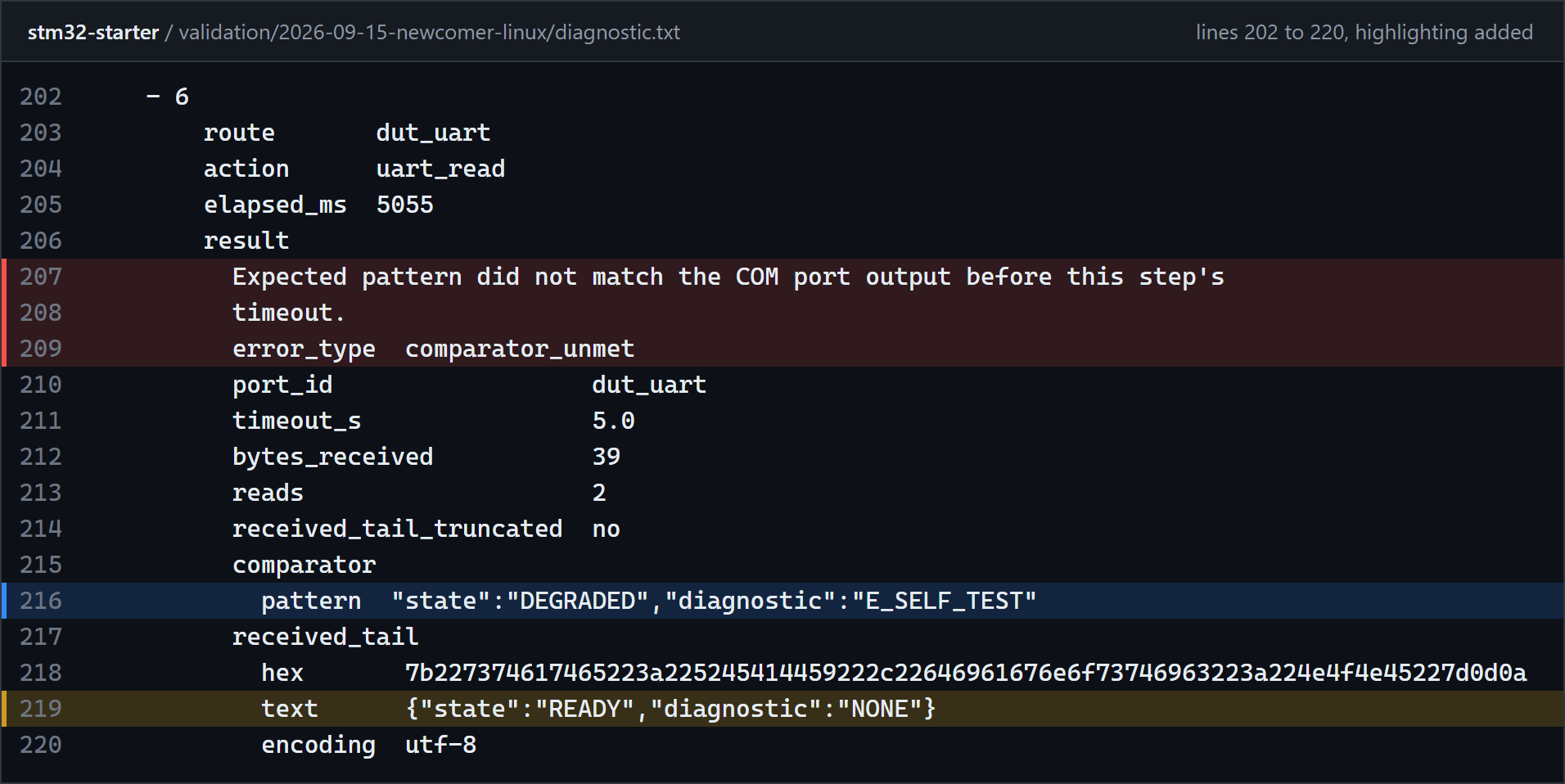
Figure 1. Step 6 of the diagnostic plan on the shipped firmware, lines 202 to 220 of diagnostic.txt in the 2026-09-15 record (Agentic HIL 0.21.5, OpenOCD). Red marks the failure, blue the plan's claim, amber what the board sent. Highlighting added, text unchanged.
The report names the claim that went unmet and quotes what the board sent
instead, in hex and as text: 39 bytes in two reads,
{"state":"READY","diagnostic":"NONE"}. That is the protocol's answer to
STATUS and to DIAG CLEAR, and the nominal and recovery plans, whose claims
are about those two commands, passed. So the failure points at one command,
DIAG ON, rather than at a silent board or at the firmware in general.
The failing run still cleaned up after itself. Its cleanup closed the serial
session (safe_state_confirmed yes, lease_state released), and the run then
recovered the bench on its own (reap_processes, reset_halt, probe_target,
outcome recovered, incident_open no), as
lines 221 to 263
of the same file show.
5. The fix
The record's diagnosis starts from that report: DIAG ON produced the healthy
answer while STATUS and DIAG CLEAR behaved. firmware/src/main.c compared
the command against DIAG ENABLE, a literal the protocol never sends, so
DIAG ON fell through both branches to report_status() with
diagnostic_active still false, which is exactly the answer the report quoted.
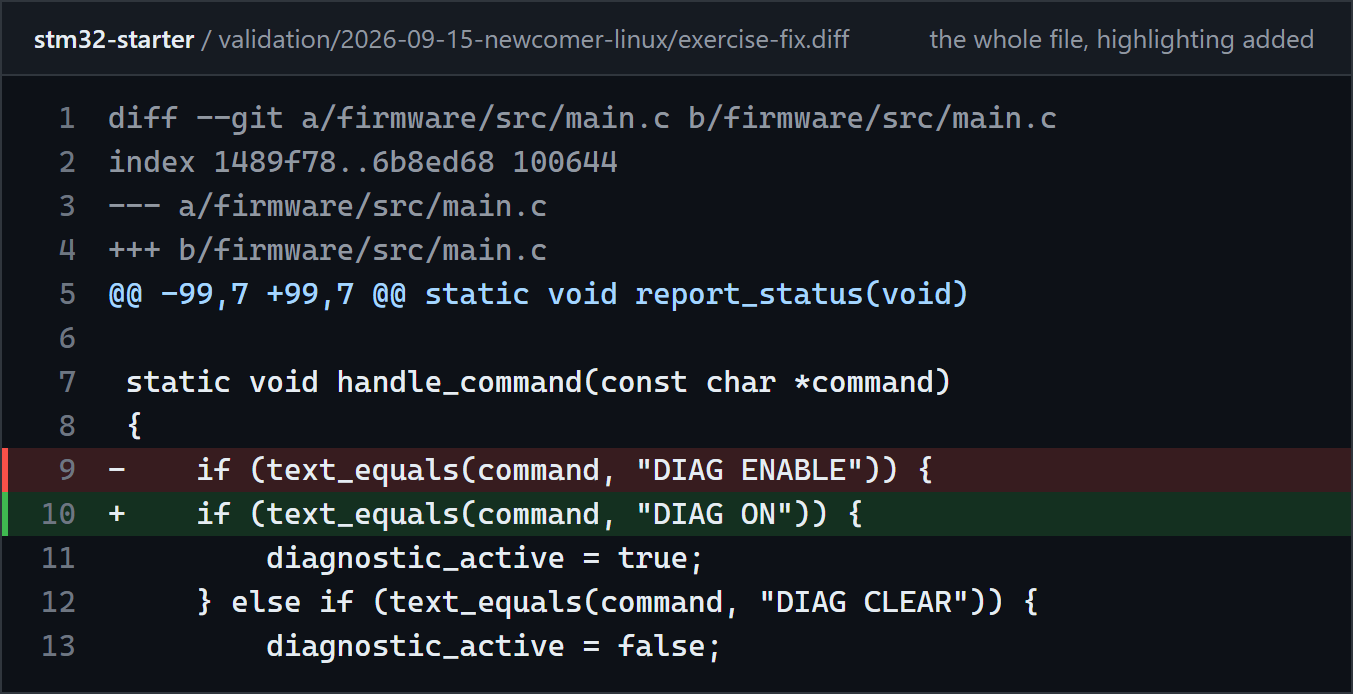
Figure 2. The fix, the whole of exercise-fix.diff in the same record. Red is the removed line, green the added one. Highlighting added, text unchanged.
One string literal changed, no test plan and no protocol were touched, and
git status --short showed one line. The change stayed in the clone,
uncommitted.
6. Rebuild, rerun, and the checked result
cmake --build --preset Debug
agentic-hil test-reactor --test-config tests/hil/nominal.testconfig.yaml
agentic-hil test-reactor --test-config tests/hil/diagnostic.testconfig.yaml
agentic-hil test-reactor --test-config tests/hil/recovery.testconfig.yaml
The rebuilt image is 932 bytes, and all three plans passed on it. The step that had failed matched on its first read:
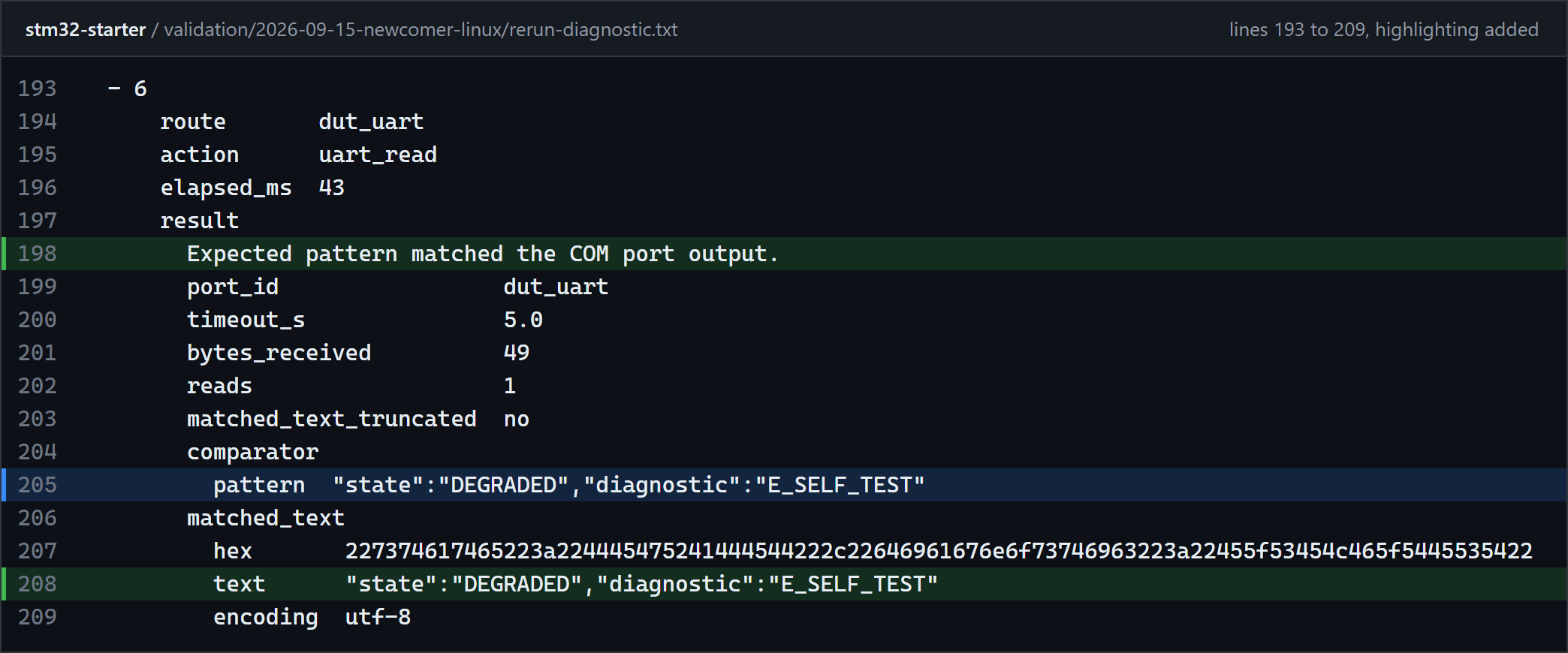
Figure 3. Step 6 of the diagnostic plan on the fixed firmware, lines 193 to 209 of rerun-diagnostic.txt in the same record. Green marks the match, blue the plan's claim. Highlighting added, text unchanged.
The six reports show what changed between the two rounds and what did not:
| Report | Plan | Flashed image, sha256 | Result |
|---|---|---|---|
| run-1-nominal.json | nominal | 0c219181f7ca..., shipped |
ok: true |
| run-2-diagnostic.json | diagnostic | 0c219181f7ca..., shipped |
ok: false, step 6 comparator_unmet |
| run-3-recovery.json | recovery | 0c219181f7ca..., shipped |
ok: true |
| run-4-nominal-after-fix.json | nominal | 5a2d6438a595..., fixed |
ok: true |
| run-5-diagnostic-after-fix.json | diagnostic | 5a2d6438a595..., fixed |
ok: true |
| run-6-recovery-after-fix.json | recovery | 5a2d6438a595..., fixed |
ok: true |
Each plan's test_config_sha256 is the same before and after the fix, so the
second round ran byte for byte the same plans as the first, and only the
firmware changed.
Every run reports cleanup_ok and audit_ok true. Afterwards
agentic-hil lease-status answered
Nothing on this bench is held and no incident is standing., and a final
agentic-hil doctor exited 0 with verdict ok
(end-state.txt).
Errors, the planted defect and the corrections
What went wrong on the way is kept apart from the defect the starter plants on purpose.
- The planted defect. The red diagnostic plan is the exercise: the firmware ships with that defect, the plan claims the answer the protocol table gives, and the fix belongs in the firmware. Neither record on this page ran a plan with a deliberately wrong expectation.
- The command was not on
PATH(Linux, 0.21.5). The installer reported that it had added a line to~/.bashrcso that the next shell would find the command. A new login shell did not find it: a login shell reads~/.profile, and the fresh home directory had no~/.profilethat reads~/.bashrc. The record puts that down to how its home directory was made rather than to a defect, since an account created withuseradd -mgets such a file from the distribution's skeleton. Correction: the README'sexport PATH="$HOME/.local/bin:$PATH"fixed it at once (friction point 2). - A refused first plan (Windows, 0.21.1). On 2026-09-03 the first hardware
plan was refused with
audit_unavailableoverunsafe_configured_path: a configuration left by an earlier walk named a state root that this Windows profile would not accept. The refusal's remediation named the repair. Correction:agentic-hil init --forcerewrote that one line of the configuration and nothing else. - A failed flash erase (Windows, 0.21.1). The next nominal attempt was
refused with
flash_erase_failed, and the report carried the programmer's own transcript, with the lineError: failed to erase memory. Its guidance said to retry the flash once, with nothing to recover first, and its recovery block reportedoutcome recovered. Correction: the identical command programmed and verified the image, and the record notes that the refusal did not recur in the eight plan runs after it. - A failure-worded line in passing steps (Linux). Each of the six Linux
runs carries
Error: Error setting register pcfrom OpenOCD in its reset step, underbackend_warnings, next tosuccess_confirmed yes. The step says that OpenOCD printed one failure-worded line in a run its own success marker confirmed, and quotes the line instead of hiding it. The record lists it because a first-time reader stops at it; there is nothing to fix.
The same loop on Windows
The
Windows record
of 2026-09-03 ran the same three plans with Agentic HIL 0.21.1 from the
project environment (uv run agentic-hil), through the STM32CubeProgrammer CLI
2.23.0 (STM32CubeCLT 1.22.0) over SWD, on a Nucleo-F446RE. After the two
refusals above, the nominal and recovery plans passed and the diagnostic plan
failed at step 6 with the same answer, quoted in text and in hex. The same
one-line fix made it pass, and all three plans then passed twice on one fixed
image, with nothing edited or rebuilt between the two rounds. Its reports and
logs are in
shipped/,
green-1/
and
green-2/.
Records and versions
- Linux, 2026-09-15, Agentic HIL 0.21.5 with OpenOCD 0.12.0:
the record
with the installer, setup and doctor output, the configuration
setupwrote, the build log, the six plan transcripts, the fix and the six reports. - Windows, 2026-09-03, Agentic HIL 0.21.1 with STM32CubeProgrammer CLI 2.23.0: the record with the reports and logs of the shipped round and of both green rounds, and the report of the refused flash.
Both records predate the current release; the changelog lists what changed since 0.21.5. To run the loop yourself with a Nucleo-F446RE, follow the starter's three steps. With your own firmware project and board, begin in the next section, and share what happened, green or red.
Begin in your existing firmware project
Keep your firmware repository and coding agent. You need the target's build toolchain and a supported debug probe/backend installed on the same computer, plus a serial connection for UART feedback. Agentic HIL does not install the compiler or replace your build system.
Install once, with your agent CLI available on PATH:
Linux or macOS:
curl -LsSf https://agentic-hil.github.io/install.sh | sh
Windows, in PowerShell:
irm https://agentic-hil.github.io/install.ps1 | iex
The installer registers the skill and MCP server for the Claude Code, Codex and opencode CLIs it finds. Restart your agent once, open your firmware project and give it a concrete task, for example:
Set up the board attached to this computer for this firmware project. Build the firmware, flash it, and check that STATUS over UART answers READY. If the response is wrong, diagnose and fix the firmware, then rerun the check. Report the bench permissions and keep the test plan and run evidence.
Replace STATUS and READY with your firmware's actual
protocol. After the restart, the agent can create the project's bench
configuration over MCP and report the devices and permissions. That
configuration lives outside the repository and binds the intended probe,
target and serial port. If a required action is refused, the agent reports
the refusal; the operator decides whether to grant it.
Installation covers registration when your CLI was not found, manual setup and the checksummed installer route. The agent quickstart has the setup fallback path. Configuration explains how to bind a bench that automatic discovery cannot resolve.
Check your probe and backend
Support depends on the debug probe, backend and configured target, rather than a certified board list:
| Probe | Backend |
|---|---|
| ST-Link | OpenOCD or STM32CubeProgrammer CLI |
| CMSIS-DAP | pyOCD |
OpenOCD needs the appropriate interface and target scripts. pyOCD needs the
agentic-hil[pyocd] extra and a supported target type; many vendor targets
also need a separately installed CMSIS device-family pack. agentic-hil doctor
checks the configured backend and target support. See
backend prerequisites
and Support before assuming your bench is covered.
The software supports Linux, macOS and Windows. The recorded hardware runs on this page cover Linux and Windows with ST-Link on a Nucleo-F446RE; they do not prove every supported host, probe or target combination.
Share your own-board result
Try one observable check in your existing firmware project, then share a first run report. A green run, a failing check, or a stop during installation or setup is welcome. Name your coding agent, board with its probe/backend, host OS and version, and how you flashed firmware before. Optionally describe the last real firmware bug you wanted the agent to investigate.
Lead with the decisive line, as the walkthrough above does: the line that says
the board did what the run claimed, or the line that says why the run stopped.
The form then asks for the agentic-hil doctor output from the same
directory. Each plan run prints the path of the report it keeps, and one
command prepares an evidence bundle from that report:
agentic-hil run-evidence --report <run report> --out <directory>
The bundle's two summaries leave out probe identities and paths from outside
the workspace, while its logs/ are copied byte for byte and can still name a
device path (the evidence bundle).
Preparing it uploads nothing: attach it or link to it only after reviewing its
files and removing secrets, local user names and private paths. If installation
or setup stopped before a report was produced, say where. A question that is
not a report yet goes to
Discussions Q&A.
Each part in depth
For your own project, start with one observable firmware response and a test plan that states the expected answer. These pages cover each part:
- Flash and reset: image verification, probe access and recorded flash/reset results.
- UART and CAN feedback: the failing UART test and firmware fix, plus CAN support and its evidence limits. No published record on that page shows CAN driving a board.
- Plans without a board: validate the plan before hardware access. A passing plan check does not test the firmware or wiring.
Agents use MCP tools, and repeatable checks use declarative plans or the pytest integration. No object SDK is required. For sensor stimulus and physical fault injection, HardCI adapters are the first-party reference hardware; the UART starter loop above needs no such adapter.